Monday, 28 November 2016

Arrays

In computer science, an array data structure, or simply an array, is a data structure consisting of a collection of elements (values or variables), each identified by at least one array index or key. An array is stored so that the position of each element can be computed from its index tuple by a mathematical formula.

In computer science, an associative array, map, symbol table, or dictionary is an abstract data type composed of a collection of (key, value) pairs, such that each possible key appears just once in the collection. Operations associated with this data type allow: the addition of a pair to the collection.

Image result for computer science array


A disk array is a hardware element that contains a large group of hard disk drives (HDDs). It may contain several disk drive trays and has an architecture which improves speed and increases data protection. The system is run via a storagecontroller, which coordinates activity within the unit.

An array is an aggregate data structure that is designed to store a group of objects of the same or different types. Arrays can hold primitives as well as references. The array is the most efficient data structure for storing and accessing a sequence of objects.

MIDI

MIDI (Musical Instrument Digital Interface) is a protocol designed for recording and playing back music on digital synthesizers that is supported by many makes of personal computer sound cards. Originally intended to control one keyboard from another, it was quickly adopted for the personal computer.

MIDI (Musical Instrument Digital Interface) is a protocol developed in the 1980's which allows electronic instruments and other digital musical tools to communicate with each other. MIDI itself does not make sound, it is just a series of messages like "note on," "note off," "note/pitch," "pitch-bend," and many more.

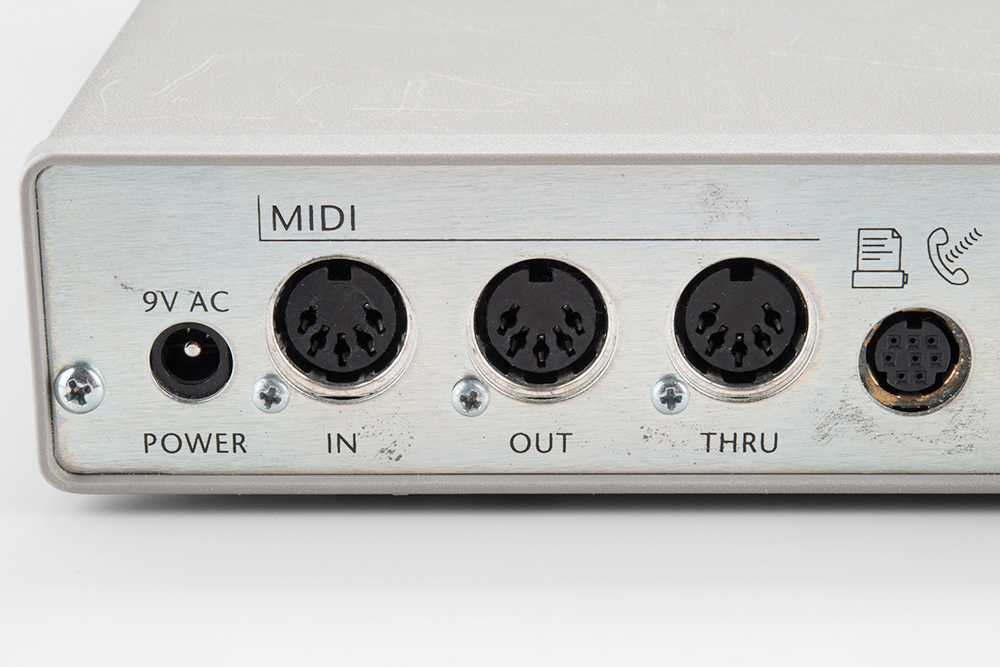
Image result for MIDIA MIDI interface is a device that provides MIDI In/Out to and from a computer or MIDI-equipped hardware via standard 5-pin MIDI jacks. There are standalone MIDI interfaces, virtually all of which connect to a computer via USB.

Thursday, 17 November 2016

Programming- Arrays

Arrays

An Array is a data structure that stores many items using a single variable.
An Array is like lots of boxes held together in a named variable. Each box has a position:

Dim Numbers(4) As Integer

the number 4 indicates the size of the Array.

Dim Exammarks(5) As single

Exammarks(0)= console.readline()
Exammarks(1)= console.readline()
...

It is useful to make use of For loops to easily imput the data into the Array.

Representing Sound in a computer

Analogue-  Analog refers to audio recorded using methods that replicate the original sound waves.


 Many times, digital audio companies try to hide this fact with fancy words like “Uncompressed” and “Lossless”. These words are very misleading as all digital audio features some compression and loss of the original signal. However, even the best trained human ear may not be able to tell the difference between a high quality digital signal and an analog audio signal.
An easy way to visualize digital audio is to consider the difference between a regular light bulb and a strobe light (Those lights designed to flash on and off very quickly. Commonly found at concerts or Halloween displays). In this example, an analog audio signal is comparable to a regular light bulb, whereas a digital audio signal would be similar to a strobe light. A strobe light can flash so fast that you hardly notice the moments when it is off.


Analog, Digital Audio Diagram

Digital-

Digital sound is broken down into thousands of samples per second. Each sound sample is stored as binary data.

Digital audio quality

Factors that affect the quality of digital audio include:

Sample rate - The sample rate is how many samples, or measurements, of the sound are taken each second. The more samples that are taken, the more detail about where the waves rise and fall is recorded and the higher the quality of the audio. Also, the shape of the sound wave is captured more accurately.

Each sample represents the amplitude of the digital signal at a specific point in time. The amplitude is stored as either an integer or a floating point number and encoded as a binary number.


Bit depth - the number of bits available for each clip

Bit rate - the number of bits used per second of audio
Sound waves coming out of a CD and VOIP. CD wave is smoother as is better quality


Monday, 14 November 2016

MetaData and File compression

Metadata- This is data that goes alongside a photo and has info on it like where it was taken, what format it is in, and the resolution.

Compression

Compression is the act of reducing the number of bits used to represent data.

PNG is a lossless type
often used when the image might be changed by another person. It retains a high quality while still have a reasonable file size.

Cameras often use their own format to store an image however it is often quite large due to it having a large resolution. 
Jpeg is often used because it is still a fairly high quality for a relatively small file size.

Gif's use 8 bits and are used for small animations.


Lossless compression- compressed image is as accurate as the original.

uses RUN LENGTH ENCODING. This means it shortens the number of bits needed to represent data by grouping it together.
b=blue
b,b,b,b,b,b,b,b can be shortened to 8b.

Lossy- there is more deg in the data.

Thursday, 10 November 2016

Glossary

Binary- a number system that uses base 2 and is the way computers process data.

Denary- The normal numbering system that uses base 10.

Integer- a whole number that can be positive or negative. Including 0.

Real Number- Any positive or negative number without a fractional part.

Ordinal number- any numbers which follow an order e.g 1-2-3-4.

Byte- 8 bits

Nibble- 4 bits

Bits- the smallest representative value for a computer to process. Can be a 1 or 0.

Metadata- data accompanies the image and has information on it.

Data types;
JPEG
PNG
GIF

Compression- the way of reducing the number the number of bits to represent data.

Lossless Compression- A way of compressing the data without losing any quality or accuracy.

Parity system- A way of checking if data is accurate and that it is complete and has not been tampered with.

Pixel- The smallest

Bit mapped graphics- Used pixels to display an image
Vector graphics- uses shapes and mathematical formula to construct an image

Trace table- A table that how numbers change when a program or code is followed.

Floating point number- A number r

2's Complement- a way of representing a negative number in a binary.

Mantissa- This is the main number. standard form has the decimal between a 0 and a 1.

Exponent- Tells us how far the decimal point is moved left or right.

RLE- Run length encoding,
A form of lossless compression in which a sequence is shortened. b,b,b,b=4b

Precision- how accurate something is.

Hexadecimal Representation- a way of representing numbers using 0-9 than letters for the numbers 10+. E.g 11=b

Bubble sort- a way of sorting numbers by comparing and swapping. each pass brings the largest number to the top each time until they are in order.


Hardware- The real physical/electrical components of the computer.

Software- Software is the

Application software-

Utility program- These help the computer by keeping the computer in an efficient state. They are in charge of the 'house keeping' such as deleting old files.

Library programs-

Translators-

Compiler-

Assembler-

Interpreter-

Operation system- This manages the system hardware and creates the 'virtual machine' for the user.

Virtual machine-

Resource management-

Processor-

Scheduling-

Memory management-

File management-

Peripheral-

Pseudo Code


Pseudocode


Most programs are developed using programming languages. These languages have specific syntax that must be used so that the program will run properly. Pseudocode is not a programming language, it is a simple way of describing a set of instructions that does not have to use specific syntax.


Common pseudocode notation

There is no strict set of standard notations for pseudocode, but some of the most widely recognised are:

INPUT – indicates a user will be inputting something

OUTPUT – indicates that an output will appear on the screen
WHILE – a loop (iteration that has a condition at the beginning)
FOR – a counting loop (iteration)
REPEAT – UNTIL – a loop (iteration) that has a condition at the end
IF – THEN – ELSE – a decision (selection) in which a choice is made
any instructions that occur inside a selection or iteration are usually indented

Example

 Set total to zero
Set grade counter to one
While grade counter is less than or equal to ten

    Input the next grade

    Add the grade into the total
Set the class average to the total divided by ten
Print the class average.